
A paper CV tells what you’ve done. A video CV shows who you are: in a couple of minutes it puts your voice, your face and your way of working in front of the person who has to choose you. We made one for Marco Sammuri, golf instructor, and in this article we explain how we did it and how the same method works for any professional who wants an effective video CV.
In this article
Why a video CV works
Recruiters, clubs and clients receive dozens of identical applications. A short, well-made video stands out for three simple reasons:
- It shows personality. Tone of voice, energy and the way you explain things are hard to put on paper and very easy to see on video.
- It shows the work. In trades where people watch someone do something, like teaching, coaching, welcoming or selling, seeing is more convincing than reading.
- It’s easy to share. A video link can go on LinkedIn, in an email, on a website or in a QR code printed on the paper resume.
For a golf instructor the video CV matters even more: a club or a student wants to know how you teach, how you speak to a beginner and how you demonstrate a swing. A video answers it all at once.
The project: a video CV for a golf instructor
Marco Sammuri needed a presentation able to show both his skills on the course and the way he works with students. The goal was a clean, professional video to send to clubs and academies and to share online.
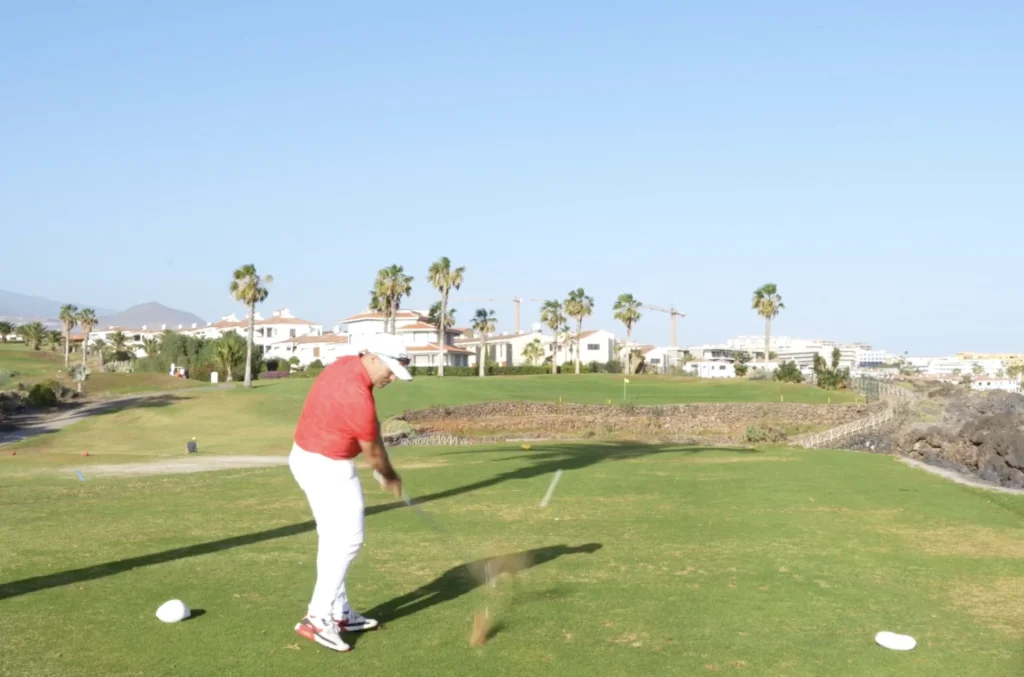
How we produced the video CV
1. Planning and script
Every good video is born before the camera is switched on. We worked out with Marco what he wanted to say, in what order and which skills to show. A short script keeps the video focused and avoids pauses and repetition.
2. Camera and stability
We shot with a Sony Alpha 7 IV, a full-frame camera that gives sharp, clean images even in changing outdoor light. The camera sat on a Manfrotto Befree Advanced carbon tripod, light enough to move quickly around the course and stable enough for locked-off shots.
3. The teleprompter for speaking naturally
Not everyone is used to talking to a camera. To help Marco look straight into the lens and stay natural we used a 12.9″ iPad Pro as a teleprompter: he could follow the text without memorizing it and the result feels like a conversation, not a performance.
4. The shots
We chose the shots to show Marco at work: close-ups while he speaks, wider frames when he demonstrates technique. Changing the shot keeps attention high and gives the video rhythm.
5. The edit
The final edit was done in Adobe Premiere Pro: picking the best takes, cleaning up the audio, balancing colours and simple titles. The goal was a short, polished video in which every second has a reason to be there.
6 tips for an effective video CV
- Keep it short. One or two minutes is almost always enough: beyond that, few people watch.
- Start strong. Say who you are and what you do right away, in the first seconds.
- Show, don’t list. Instead of naming your skills, demonstrate them.
- Look after the sound. People forgive average pictures more easily than poor audio.
- Choose the right place. Shoot where you really work: for Marco, the golf course.
- Close with a next step. Contact details or a link to your profile, so anyone interested knows what to do.
A video CV isn’t only for job seekers
The same method works for many professionals who sell their own skills: coaches, instructors, consultants, therapists, real-estate agents and freelancers. A short introduction video on your website builds trust before the first phone call.
At Donkey Lab we follow the whole process: planning, filming, editing and delivery of files ready for web and social media. Photo and video are part of our services, together with websites, branding and images for the real-estate sector. To see more work, look at the portfolio.
Frequently asked questions about the video CV
How long should a video CV be?
Between one and two minutes is ideal: enough to introduce yourself and show your skills, short enough to be watched to the end.
Do I have to memorize a script?
No. We use a teleprompter, so you read the text while looking at the camera and the result stays natural.
Where can I use a video CV?
On LinkedIn, in job applications sent by email, on your website, on social media and as a QR code on a printed resume.
Can you shoot outside a studio?
Yes. We prefer to shoot where you really work, because the setting tells part of your story.
Want your own video CV?
Tell us what you do and who you want to reach: we’ll plan a short video that shows it. If you’d like to see more work, take a look at the portfolio.